> ## Documentation Index
> Fetch the complete documentation index at: https://docs.sidecardata.com/llms.txt
> Use this file to discover all available pages before exploring further.
# Agent Console
> Configure Sidecar agents, create repeatable jobs, and review their runs
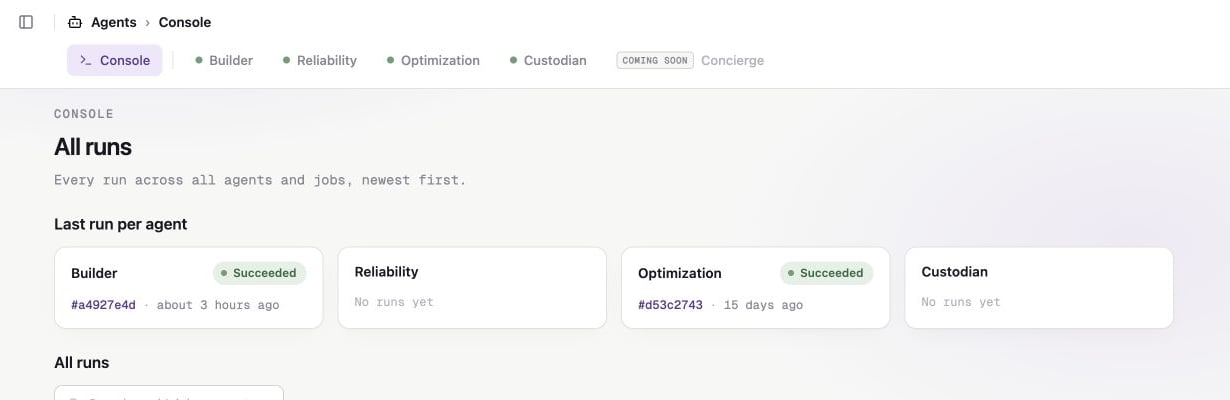
The Agent Console is where you configure Sidecar agents, create jobs, and review their work. Open **Agents** in Sidecar to get started.
Builder, Reliability, Optimization, and Custodian are available. Concierge appears as coming soon.
You must be an Account Admin to open the Agent Console, manage its settings,
or approve a gated tool action.
 ## How the Agent Console is organized
### Agents
Each agent has a specific role. For example, Builder handles engineering work while Reliability investigates data incidents. Start with [Choose an agent](/products/agent-console/agents/choose-an-agent) to compare them.
An agent's **Settings** page controls its connected MCP servers and the defaults used for Slack runs.
### Jobs
A job is saved work for one agent. It contains instructions, repository scope, output settings, a trigger, MCP access, and tool permissions.
You can create a custom job, install a preset, or duplicate a template. The options depend on the agent. See [Create a job](/products/agent-console/jobs/create-a-job).
### Runs
A run is one execution of a job or Slack request. The **Console** lists runs across every agent. Open a run to review its progress, transcript, approvals, and artifacts.
### Resources and tools
Agents can use several types of context. Each type has its own setup path:
| Resource | What it provides | Where you configure it |
| --------------- | ------------------------------------------------------------------- | ----------------------------------------------------------- |
| Source control | Repository contents and a destination for branches or pull requests | **Integrations**, then the job's repository scope |
| dbt | Project metadata, tests, and lineage | **Integrations** |
| MCP servers | External tools such as warehouse query access | **Integrations → MCP Servers**, then agent and job settings |
| Knowledge Store | Company context, policies, and playbooks | **Context → Knowledge Store** |
Use the [Agent Console setup guide](/products/agent-console/setup/overview) to prepare these resources.
## Start here
Follow a complete Builder example from setup through the first run.
Compare each live agent and its intended work.
Connect repositories, dbt, MCP servers, and knowledge.
Send an ad hoc request by direct message.
## How the Agent Console is organized
### Agents
Each agent has a specific role. For example, Builder handles engineering work while Reliability investigates data incidents. Start with [Choose an agent](/products/agent-console/agents/choose-an-agent) to compare them.
An agent's **Settings** page controls its connected MCP servers and the defaults used for Slack runs.
### Jobs
A job is saved work for one agent. It contains instructions, repository scope, output settings, a trigger, MCP access, and tool permissions.
You can create a custom job, install a preset, or duplicate a template. The options depend on the agent. See [Create a job](/products/agent-console/jobs/create-a-job).
### Runs
A run is one execution of a job or Slack request. The **Console** lists runs across every agent. Open a run to review its progress, transcript, approvals, and artifacts.
### Resources and tools
Agents can use several types of context. Each type has its own setup path:
| Resource | What it provides | Where you configure it |
| --------------- | ------------------------------------------------------------------- | ----------------------------------------------------------- |
| Source control | Repository contents and a destination for branches or pull requests | **Integrations**, then the job's repository scope |
| dbt | Project metadata, tests, and lineage | **Integrations** |
| MCP servers | External tools such as warehouse query access | **Integrations → MCP Servers**, then agent and job settings |
| Knowledge Store | Company context, policies, and playbooks | **Context → Knowledge Store** |
Use the [Agent Console setup guide](/products/agent-console/setup/overview) to prepare these resources.
## Start here
Follow a complete Builder example from setup through the first run.
Compare each live agent and its intended work.
Connect repositories, dbt, MCP servers, and knowledge.
Send an ad hoc request by direct message.