> ## Documentation Index
> Fetch the complete documentation index at: https://docs.sidecardata.com/llms.txt
> Use this file to discover all available pages before exploring further.
# Review upstream changes for downstream impact
> Configure a Custodian job that reviews upstream GitHub pull requests for downstream impact
In this recipe, you configure Custodian to review pull requests in one upstream GitHub repository for evidence-supported effects on one downstream repository.
The job posts its findings as a source-control review. For this first setup, you use **Review only** so Custodian does not change downstream code.
## Before you start
You need:
* An Account Admin role in Sidecar
* Permission to install or configure GitHub apps for the relevant organizations
* One upstream GitHub repository that receives changes
* One different downstream GitHub repository that may depend on those changes
* The standard Sidecar Data GitHub app connected to the downstream repository
* The Custodian GitHub app installed with access to the upstream repository
Both repositories must use `github.com`.
## Configure the GitHub integrations
In Sidecar, select **Integrations → GitHub**.
If the standard Sidecar Data GitHub app is not connected, click **Link Sidecar Data** and grant it access to the downstream repository.
On the same GitHub integration page, find **Custodian** and click **Manage access in GitHub**.
Install or configure the Custodian GitHub app with access to the upstream repository. If GitHub shows an approval request, ask an organization administrator to approve it.
Return to Sidecar and confirm that the Custodian installation lists the upstream repository as accessible.
## Subscribe the upstream repository
Select **Agents → Custodian**, then click **Settings**.
Under **Scope → Subscribed repositories**, find the upstream repository and click **Bind**.
You can use **Bind all accessible** when every accessible repository should be available as a Custodian upstream.
Confirm that the repository shows as bound and accessible.
## Duplicate the Custodian template
Return to the Custodian page and click **From preset**.
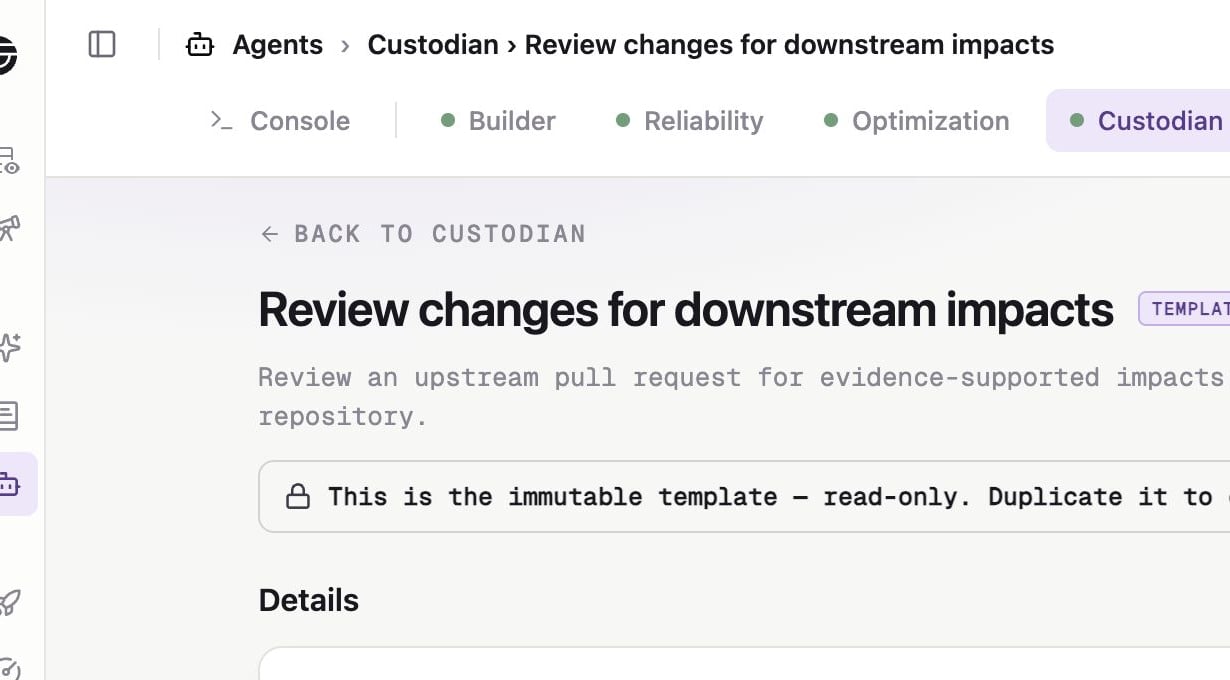
Find **Review changes for downstream impacts** and click **View template**.
The template is read-only and never runs directly.
Click **Duplicate**. Sidecar creates an inactive custom copy and opens its configuration page.
 ## Configure the review job
Use a name that identifies the repository relationship, such as `API changes → analytics impact review`.
Add a description that helps Account Admins recognize the job in the Console.
Keep the default instructions for the first job. Add only constraints specific to this upstream and downstream relationship.
Under **Scope**, select:
* **Upstream repository** — the repository you bound to Custodian
* **Downstream repository** — the different repository connected through the standard Sidecar GitHub integration
Save the scope.
Under **Review behavior**, select **Review only**.
Leave **Suppress no-findings comments** off for the first test. This lets you confirm that the workflow ran even when it finds no downstream impact.
After validating the workflow, you can choose **Draft PR when a safe fix is verified**.
Confirm that the readiness panel marks the upstream and downstream repositories ready.
Knowledge Store and Context Garage checks are informational. They do not block activation.
Switch the job to **Active**.
Sidecar allows only one active Custodian downstream-impact job for a given upstream repository. If activation fails, pause the existing job or choose another upstream.
## Test the workflow
Create a safe test pull request in the upstream repository, or push a new commit to an existing test pull request.
Custodian starts from the GitHub pull-request webhook. This job does not have **Run now**.
Open **Agents → Console** and select the Custodian run. Review the evidence, findings, and delivery status.
Return to the upstream pull request and find the Custodian review comment.
With **Review only**, Custodian does not change downstream code. If you later enable draft remediation, review any downstream draft pull request before merging.
## Maintain the job
* Pause the job before changing a repository binding.
* Restore GitHub app access if readiness reports an inaccessible repository.
* Use **Retry** when the same pull-request snapshot should run again.
* Use **Run again** when the upstream head or downstream base branch has moved.
## Configure the review job
Use a name that identifies the repository relationship, such as `API changes → analytics impact review`.
Add a description that helps Account Admins recognize the job in the Console.
Keep the default instructions for the first job. Add only constraints specific to this upstream and downstream relationship.
Under **Scope**, select:
* **Upstream repository** — the repository you bound to Custodian
* **Downstream repository** — the different repository connected through the standard Sidecar GitHub integration
Save the scope.
Under **Review behavior**, select **Review only**.
Leave **Suppress no-findings comments** off for the first test. This lets you confirm that the workflow ran even when it finds no downstream impact.
After validating the workflow, you can choose **Draft PR when a safe fix is verified**.
Confirm that the readiness panel marks the upstream and downstream repositories ready.
Knowledge Store and Context Garage checks are informational. They do not block activation.
Switch the job to **Active**.
Sidecar allows only one active Custodian downstream-impact job for a given upstream repository. If activation fails, pause the existing job or choose another upstream.
## Test the workflow
Create a safe test pull request in the upstream repository, or push a new commit to an existing test pull request.
Custodian starts from the GitHub pull-request webhook. This job does not have **Run now**.
Open **Agents → Console** and select the Custodian run. Review the evidence, findings, and delivery status.
Return to the upstream pull request and find the Custodian review comment.
With **Review only**, Custodian does not change downstream code. If you later enable draft remediation, review any downstream draft pull request before merging.
## Maintain the job
* Pause the job before changing a repository binding.
* Restore GitHub app access if readiness reports an inaccessible repository.
* Use **Retry** when the same pull-request snapshot should run again.
* Use **Run again** when the upstream head or downstream base branch has moved.